
Let customers book while you’re on the job.
Customers pick a time you’re actually free, right from your website. Harbor checks your Google Calendar, books the time, sends the invite and puts the booking in your Leads.

Your guide here: Marina from Onboarding (AI), AI onboarding guide. Part of Discovery Harbor.


JordanA made-up roofer, for this story
Half my day is phone tag about when I can come look at a roof.
Marina from Onboarding (AI)AI onboarding guide
Show your open times on your site. They pick one, it’s on your calendar, and you keep working.
The easiest pro to book usually gets the job.
Every callback is a chance for someone else to answer first. Booking on your site turns “I’ll call around” into a time on your calendar.


Bennett from Success (AI)AI customer success lead
Every booking lands in Leads with the time and their answers, so nobody waits on a callback.
JordanA made-up roofer, for this story
Can my office manager see them too?
Bennett from Success (AI)AI customer success lead
Add him to your team and he sees every booking.


Elcano from Navigation (AI)AI navigator
More people ask an AI assistant to find a pro. A website we build tells assistants your services and open times in a way they can read.
JordanA made-up roofer, for this story
So a robot books my roof inspection?
Elcano from Navigation (AI)AI navigator
It fills in your booking form. Your customer still checks it and confirms.
How it works in Harbor
Set it once. Your calendar stays the boss.
Connect your Google Calendar.
In Harbor › Get connected, sign in with Google and pick the calendar to book into. Harbor checks it for conflicts.
Harbor › Get connected › Let customers book time with you
Set your hours and lengths.
Choose your weekly hours, how long each appointment runs and how much notice you need. Customers only see times inside your hours, and never over something already on your calendar.
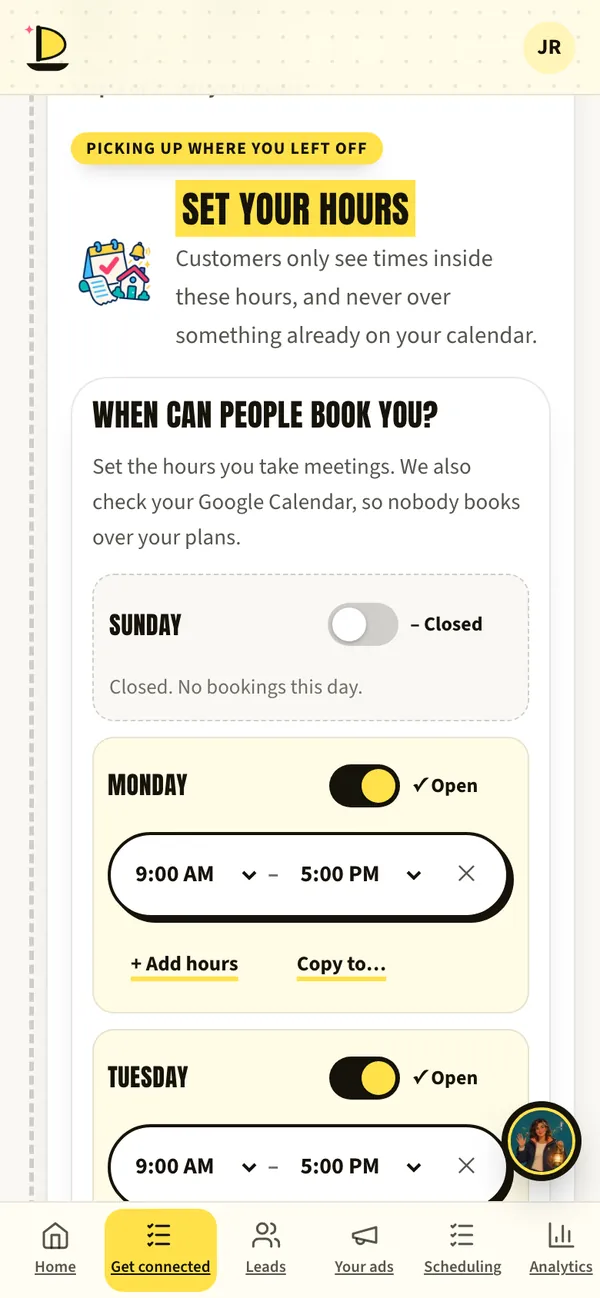
Harbor · sample data Charge for it, if you like.
Paid appointments take the payment with Stripe before the time is booked.
Getting paid, explainedThey pick a time on your site.
Customers see only times you’re free, in their own time zone, and get a Google invite.
It lands in Leads.
Every booking is a lead in Harbor with the time and their answers.
What to have ready
- The Google account with your work calendarThe calendar Harbor should book into.
- Your weekly hoursAnd how long a visit or call takes.
- A Stripe accountOnly if you charge for appointments.
What’s live today
- Waiting on reviewGoogle Calendar connectionGoogle is finishing its review of Harbor’s calendar access. Until then you may see “Google hasn’t verified this app” (tap Advanced, then Go to discoverymarketing.io), or we set it up with you on a call. Your ads can start without it.
- LiveBooking on websites we buildOnly open times, booked once, in the visitor’s time zone.
- LiveReady for AI assistantsAssistants can read your services and open times and fill in the form for your customer to confirm.
Fair questions.
Will it double-book me?
No. Harbor checks your calendar before it offers a time, and each time can only be booked once.
What if I need to move an appointment?
Move it in your calendar and give the customer a call, like you do today. Automatic rescheduling isn’t in Harbor yet.

Andy BedellFounder, Discovery Marketing
The easier you are to book, the fewer jobs you lose to whoever answered first.
Book a call with AndyNext on the voyage.
Or start at the beginning: how a launch works, step by step.



Book a call with Andy. Free, 30 minutes.
Bring your questions and your website. Andy will show you Harbor on his phone, tell you honestly whether ads make sense for your business, and give you a date for every step.
Calendar not loading? Open Andy’s calendar in a new tab.
Jordan and her roofing company are made up for this page. App screens come from Harbor’s demo with sample data. The painted scenes and films are made with AI, and every AI helper is labelled (AI). Helpers suggest; people decide.