
Get paid online, straight to your own account.
Customers pay on your website with Stripe, at the prices you set in Harbor. The money goes straight into your own Stripe account, and every sale is counted, so you can see which ads bring buyers.

Your guide here: Bennett from Success (AI), AI customer success lead. Part of Discovery Harbor.


JordanA made-up roofer, for this story
Deposits are a mess. Checks, apps, “I’ll pay you Friday.”
Bennett from Success (AI)AI customer success lead
One checkout on your site. The money goes to your Stripe account, not ours.
Your money never passes through us.
Harbor sets the price and counts the sale. Stripe moves the money to you. We never hold it.
Bennett from Success (AI)AI customer success lead
Every price comes from Harbor, never from the web page, so nobody can change what they pay.
JordanA made-up roofer, for this story
Do you see my bank details?
Bennett from Success (AI)AI customer success lead
Never. Your key goes into an encrypted vault and is never shown again. We never see card or bank details.
How it works in Harbor
Test it first. Real payments go on with you, together.
Open a Stripe account.
Open it at stripe.com in your business’s name, with your bank account for payouts.
Connect it in Harbor.
In Harbor › Get paid online, paste your Stripe key once. Harbor checks it with Stripe and sets up the connection for you.
Harbor › Get connected › Get paid online
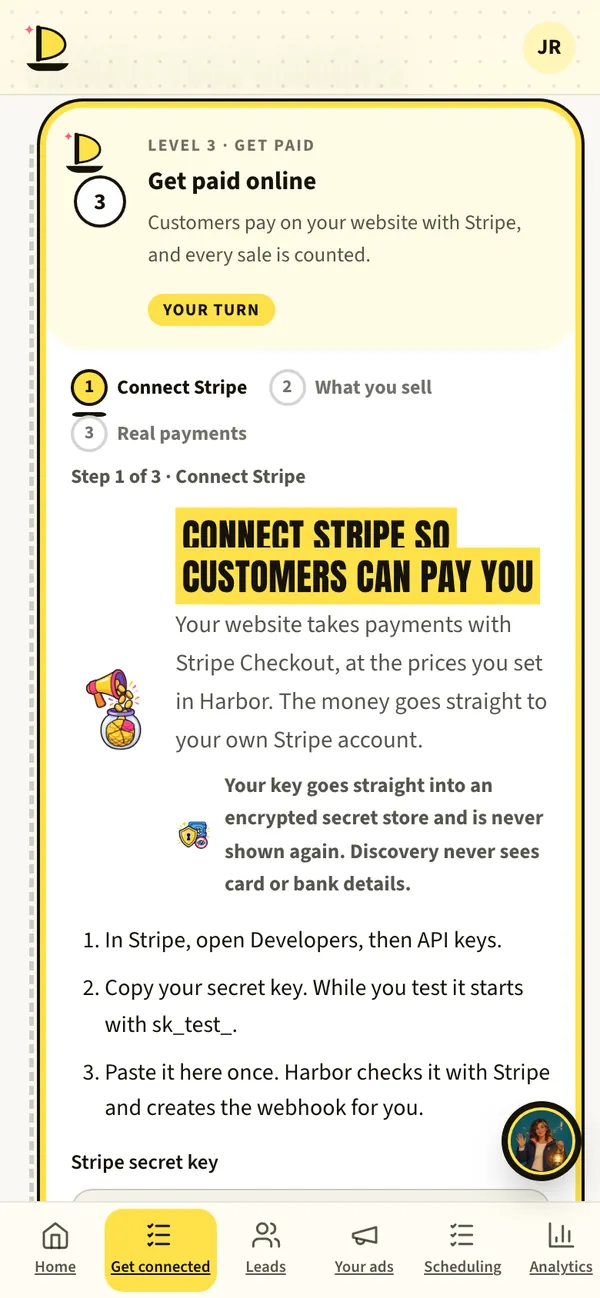
Harbor › Get connected · sample data Add what you sell.
Set your prices in Harbor: deposits, inspections, products or paid appointments.
Test it, then go live.
Test payments prove your checkout works. Real payments need your live key, and we turn them on with you.
Sales count toward your ads.
Each sale can be reported to Google Ads, so your ads learn who actually buys.
Your results
What to have ready
- A Stripe account in your business’s nameOnly an owner of the business can connect it.
- Your bank account for payoutsSet up inside Stripe, never in Harbor.
- Your price listWhat you sell and what it costs.
What’s live today
- LiveCheckout and test paymentsProve it works before real money moves.
- Switched on with youReal paymentsTurned on with you, using your live key.
- LiveSales reported to Google AdsSo ads optimize for buyers.
Fair questions.
Does Discovery Marketing take a cut of my sales?
No. Payments go straight to your Stripe account. Stripe charges its usual processing fees. Our fee is a share of ad spend, never a share of your sales.
Who can connect Stripe?
Only an owner of the business. Teammates can’t change payments.

Andy BedellFounder, Discovery Marketing
Your money never passes through us. Not your sales, and not your ad spend.
Book a call with AndyNext on the voyage.
Or start at the beginning: how a launch works, step by step.



Book a call with Andy. Free, 30 minutes.
Bring your questions and your website. Andy will show you Harbor on his phone, tell you honestly whether ads make sense for your business, and give you a date for every step.
Calendar not loading? Open Andy’s calendar in a new tab.
Jordan and her roofing company are made up for this page. App screens come from Harbor’s demo with sample data. The painted scenes and films are made with AI, and every AI helper is labelled (AI). Helpers suggest; people decide.